¶ Understanding DNG Opcodes – Lens Corrections in Leica Files and Lightroom
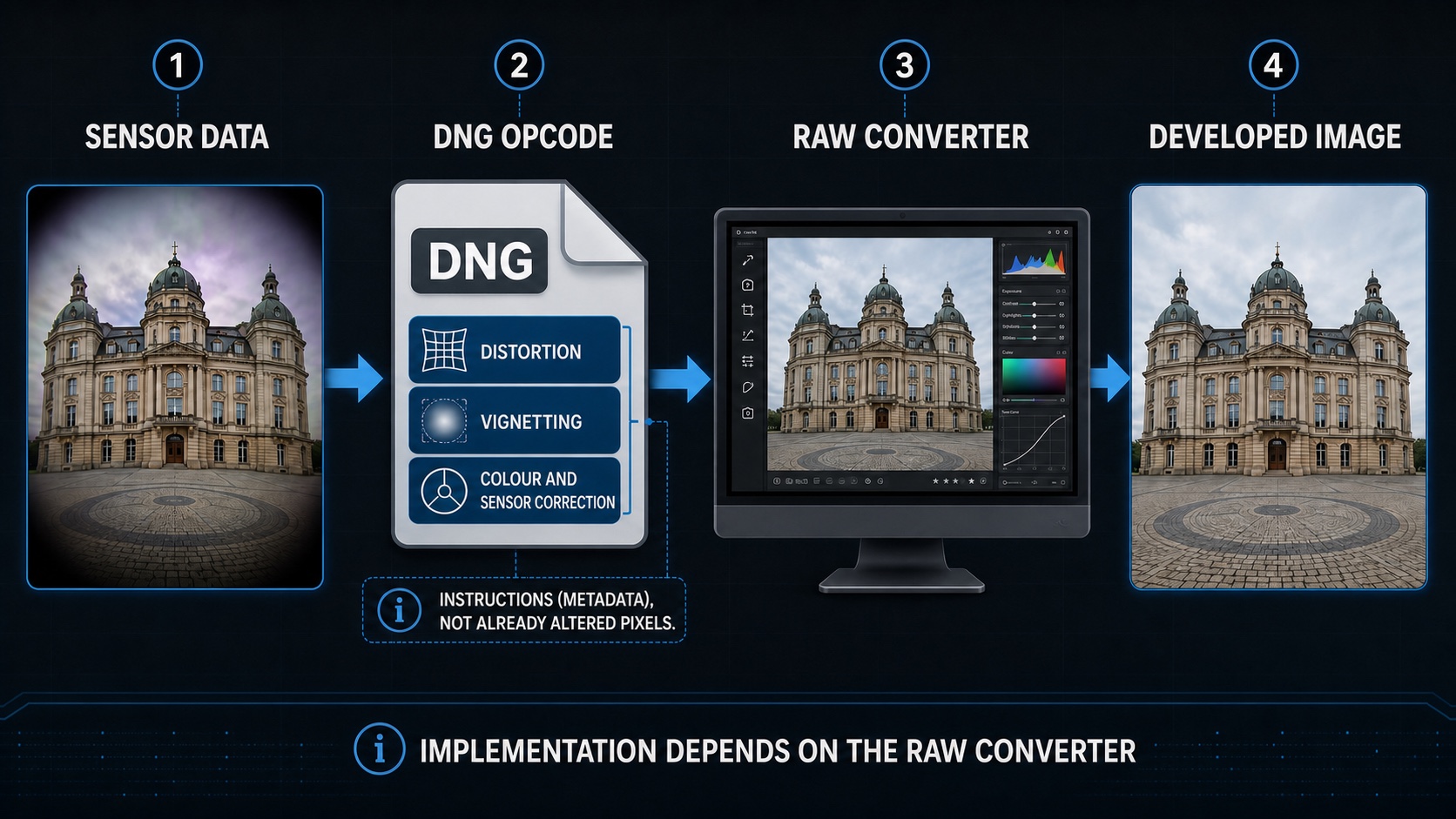
Schematic DNG Opcode workflow: sensor data and processing instructions travel together in the DNG, while a compatible RAW converter performs the correction. Click the diagram to open it at full size in a new tab.
Image note: This English process graphic was localised with AI assistance. It is a simplified editorial illustration and does not replace the Adobe DNG Specification or a technical inspection of an actual DNG file.
Language note: This English page is aligned with the reviewed German version 1.2. Open the German page.
DNG Opcodes are standardised processing instructions stored inside a DNG file. A compatible RAW converter executes these instructions at defined stages of image processing. They can correct distortion, vignetting, defective pixels and certain row or column irregularities.
In brief: An Opcode is not a previously edited pixel image. It is a calculation instruction stored in the DNG. With fixed-lens cameras such as the Leica Q family, RAW software can apply embedded corrections automatically without requiring the user to select a separate lens profile.
¶ Document information
| Document information | Definition |
|---|---|
| Document ID | FW-WIS-NB-05 |
| Title | Understanding DNG Opcodes – Lens Corrections in Leica Files and Lightroom |
| Area | Photography knowledge – Post-processing |
| Document type | SEO fundamentals and practical guide |
| Responsible | Wiki owner |
| Version | 1.1 EN |
| Translation basis | German version 1.2 |
| Last reviewed | 4 August 2026 |
| Document status | Public technical article – editorially reviewed |
| Classification | Public |
| Source basis | Adobe DNG Specification 1.7.1.0, DNG SDK 1.7.1 Build 2611 and Adobe lens-profile documentation, reviewed on 4 August 2026 |
| Next review | 1 November 2026 or after publication of a new DNG specification or materially changed Lightroom lens-profile behaviour |
| Wiki.js path | /Fotografen-Wiki/Fotowissen/Nachbearbeitung/FW-WIS-NB-05_DNG_Opcodes_und_Objektivkorrekturen |
¶ Review Traffic Light
| Review area | Status | Result |
|---|---|---|
| SEO and page structure | 🟢 Reviewed | Page settings, one H1, document information, SEO data and clear practical sections are present |
| Translation alignment | 🟢 Reviewed | Content is aligned with German version 1.2, including workflow, warnings and source separation |
| DNG specification | 🟢 Reviewed | Adobe still publishes DNG Specification 1.7.1.0 as the current specification |
| DNG SDK | 🟢 Reviewed | Adobe lists DNG SDK 1.7.1 Build 2611 dated 9 June 2026 |
| Opcode terminology | 🟢 Reviewed | Opcode lists, embedded lens profiles, Adobe profiles and manual corrections are distinguished |
| Leica Q workflow | 🟢 Reviewed | Adobe's automatic built-in lens-profile behaviour for Leica Q is described separately from optional manual corrections |
| Technical inspection | 🟢 Reviewed | ExifTool examples are read-only and explicitly require work on a copy |
| Illustration | 🟢 Reviewed | The local English JPEG is below 1 MB and opens at full size in a new tab |
| Internal links | 🟢 Reviewed | Locale-specific page targets were checked against the signed-in Wiki.js export dated 3 August 2026 |
| Software-dependent behaviour | 🟡 Review with each release | Interface wording and the ability to display or disable corrections can change between Lightroom, Camera Raw and third-party versions |
Overall status: Green with a software-version reservation. The DNG concepts, Opcode lists, Leica-Q workflow, image path and internal links are reviewed. Behaviour in a specific converter must still be documented with the exact application version and an unchanged source DNG.
¶ SEO data
| SEO field | Content |
|---|---|
| SEO title | DNG Opcodes: Leica and Lightroom corrections explained |
| Meta description | Learn what DNG Opcodes are, which corrections they perform and why Leica Q DNG files are automatically corrected and cropped in Lightroom. |
| Primary keyword | DNG Opcodes |
| Secondary search terms | Leica Q lens correction, Lightroom built-in lens profile, DNG OpcodeList, RAW distortion correction |
| Search intent | Understand embedded DNG corrections and assess RAW-converter behaviour |
| Recommended URL slug | dng-opcodes-leica-lightroom-lens-corrections |
¶ 1. What is a DNG Opcode?
DNG is an openly documented RAW format created by Adobe and an extension of TIFF 6.0. Since DNG 1.3.0.0, a file can contain Opcode lists. Each list consists of instructions that a DNG reader executes in sequence.
An Opcode contains, among other things:
- an identifier for the operation,
- the DNG version in which the operation was defined,
- flags indicating optional processing or processing required only at full quality,
- the parameters required for the calculation.
The camera can therefore store sensor data and the relevant correction instructions together. The camera does not need to complete every complex calculation itself; a RAW converter can perform it later.
¶ Important distinctions
| Term | Meaning |
|---|---|
| RAW sensor data | Originally stored measurements from the sensor |
| Metadata | Descriptive information such as camera, lens, shutter speed and exposure |
| DNG Opcode | Machine-readable instruction for a defined image-processing step |
| Lens profile | Correction data for a camera/lens model, often supplied from a software database |
| Rendered image | Result after RAW interpretation and applied corrections |
Opcodes are technically stored as metadata fields in the DNG. Unlike ordinary EXIF information, however, they define actual processing operations.
¶ 2. The three Opcode lists in a DNG
The DNG specification defines three processing stages:
| List | Processing stage | Typical purpose |
|---|---|---|
OpcodeList1 |
Immediately after reading the raw data | Corrections before linearisation, such as defective sensor pixels |
OpcodeList2 |
Immediately after mapping to linear reference values | Corrections to linear data that has not yet been demosaiced |
OpcodeList3 |
Immediately after demosaicing | Geometric correction, warping and other operations on the full image |
Instructions within a list are executed in the stored order. A DNG can contain empty lists, a single Opcode or several consecutive operations.
With a dedicated monochrome camera, ordinary Bayer colour reconstruction is unnecessary. DNG processing and possible Opcode instructions remain relevant; the operations actually present depend on the camera and file.
¶ 3. Which corrections can Opcodes perform?
DNG Specification 1.7.1.0 defines the following standardised Opcodes:
| Opcode | Purpose in plain language |
|---|---|
WarpRectilinear |
Correct radial and tangential distortion; can also address lateral chromatic aberration |
WarpFisheye |
Correct fisheye projection or geometric distortion |
FixVignetteRadial |
Correct radial vignetting |
FixBadPixelsConstant |
Interpolate pixels that contain a specified defective value |
FixBadPixelsList |
Interpolate explicitly listed defective pixels or rectangles |
TrimBounds |
Crop the image to specified boundaries |
MapTable |
Remap pixel values through a value table |
MapPolynomial |
Remap pixel values with a polynomial function |
GainMap |
Apply spatially varying gain, for example to correct uneven brightness |
DeltaPerRow / DeltaPerColumn |
Add a correction value to each row or column |
ScalePerRow / ScalePerColumn |
Multiply values in each row or column by a factor |
WarpRectilinear2 |
Extended correction for complex geometric distortion since DNG 1.6 |
Not every DNG uses every operation. The file format alone does not reveal which corrections are actually embedded.
¶ 4. Leica Q: why is the DNG corrected automatically?
Adobe lists Leica Q cameras as supporting a built-in lens profile. Adobe Camera Raw and Lightroom apply the correction automatically without requiring an external profile selection.
With a fixed-lens camera, the camera, sensor and lens are known as a complete system. This enables a coordinated workflow:
- The lens projects the optical source image onto the sensor.
- The camera stores the sensor data as a DNG.
- Embedded information describes the required corrections.
- A compatible RAW converter corrects distortion and crops accordingly.
- Editing begins with the image geometry intended by the manufacturer.
¶ What can become visible in a comparison?
If software ignores the geometric correction, or it is removed for a technical experiment, a larger raw image area may appear. At the same time, the following may be visible:
- outward-bending straight lines caused by barrel distortion,
- black or incompletely filled edges after transformation,
- a different rendering and angle of view,
- stronger edge shading,
- changed edge resolution after later correction,
- a different crop from the camera JPEG or Lightroom preview.
An uncorrected image is therefore not automatically “more authentic”. It shows an earlier technical stage, not necessarily the final geometry defined by the manufacturer.
¶ 5. Opcode, built-in profile and manual profile
These terms are often confused:
| Method | Source | Operation | Typical use |
|---|---|---|---|
| DNG Opcode | Stored directly in the DNG | Usually automatic | Defined operations inside the DNG processing pipeline |
| Built-in lens profile | Camera or file | Automatic for Leica Q in Adobe software | Fixed camera/lens system |
| Adobe lens profile | Adobe profile database | Automatically detected or selected | Interchangeable lens identified through EXIF |
| User profile | Created by the user | Assigned manually | Unsupported or unusual lens |
| Manual correction | RAW software controls | Adjusted by the user | Deliberate deviation or missing profile |
A built-in profile and an Opcode are not identical terms. Both can, however, form part of an automatically corrected DNG workflow. The RAW-software interface does not necessarily display every internal operation separately.
Do not correct twice: If an integrated profile or mandatory Opcode has already been applied, an additional manual distortion correction can worsen straight lines and image edges. Check the RAW converter's notice first and then inspect the geometry.
¶ 6. Advantages of automatic DNG corrections
- Camera and lens can be developed as a coordinated system.
- Intended image geometry becomes more reproducible between compatible programs.
- Distortion and vignetting do not need to be corrected manually for every file.
- Defective pixels or sensor-related row and column irregularities can be treated early in the RAW pipeline.
- Camera JPEG, preview and RAW development can be aligned more closely.
- Correction data travels with the individual file instead of depending entirely on a local profile database.
Engineering context: Deliberately planned digital correction can permit a lens to be made more compact or optimised in other ways. Whether and to what extent a specific lens was designed this way can only be established reliably from manufacturer or engineering documentation.
¶ 7. Possible disadvantages and limits
| Effect | Photographic significance |
|---|---|
| Crop | The final angle of view may be narrower than the complete sensor readout |
| Interpolation | Geometric warping requires new pixel positions to be calculated |
| Edge stretching | Detail and noise near the edge may look different from the untransformed file |
| Software dependency | Software with incomplete DNG support may render the file differently |
| Limited control | Depending on camera, software and version, built-in corrections may not be completely disabled through a user control |
| Preview differences | The embedded preview and newly rendered RAW view can briefly appear different |
| Version dependency | An older DNG reader may not recognise newer or mandatory Opcodes |
The DNG specification distinguishes optional and required Opcodes. Software may skip an Opcode marked as optional under defined conditions. Newer non-optional Opcodes require the minimum reader version specified in the file.
¶ 8. Assessing Lightroom and Camera Raw correctly
¶ Test procedure
- Keep the original DNG unchanged.
- Open the file in current RAW software.
- Look for a built-in profile notice under Lens Corrections.
- Do not assume that the camera JPEG, embedded preview and RAW rendering are identical.
- Inspect straight lines near the edge.
- Compare the crop and angle of view with the camera JPEG.
- Open the same DNG in two compatible converters for a software comparison.
- Record the results and software versions.
Adobe states that corrections for cameras with built-in support are applied automatically. This does not mean that every additional manual profile correction is useful. Applying distortion correction twice can make the geometry worse.
¶ Do not confuse
- Enable Profile Corrections may refer to an additional selectable Adobe profile.
- Built-in Lens Profile applied indicates a correction already embedded in the camera or file workflow.
- Transform/Perspective corrects camera position or image perspective and is not the same as optical distortion correction.
- Digital zoom or crop is a deliberate framing choice and is not automatically an Opcode.
¶ 9. Inspecting DNG Opcodes technically
Metadata tools can show whether a file contains OpcodeList1, OpcodeList2 or OpcodeList3. The output is usually technical rather than a plain-language Lightroom setting.
Example with ExifTool:
exiftool -G1 -a -s -OpcodeList1 -OpcodeList2 -OpcodeList3 file.dng
For a broader inspection:
exiftool -G1 -a -s file.dng
Important: Work only on a copy. Removing or overwriting embedded DNG fields can affect compatibility, rendering and archival integrity. The unchanged camera DNG remains the original.
Displaying field names alone does not explain every parameter. A reliable technical interpretation must consider the DNG version, Opcode ID, flags, sequence and parameters together.
¶ 10. Practical comparison for Leica Q DNG files
| Test | Observation | Conclusion |
|---|---|---|
| Architecture with straight edge lines | Do lines bend in different software? | Indicates a different distortion correction |
| Fine structure extending into corners | Do edge detail or noise change? | Possible effect of geometric correction and interpolation |
| RAW compared with camera JPEG | Do angle of view and edge crop differ? | Different processing stages or crop interpretation |
| Lightroom compared with another converter | Do geometry and vignetting match? | Indicates the level of DNG and profile support |
| Preview immediately after import | Does the image change after a short delay? | Transition from embedded preview to newly rendered RAW |
For a fair test, white balance, exposure, orientation and any additional manual crop must be identical. Otherwise, several causes are mixed together.
¶ 11. Frequently asked questions about DNG Opcodes
¶ Do Opcodes alter the original DNG?
During normal non-destructive opening, the software interprets the stored data and instructions. The camera DNG remains unchanged unless it is deliberately overwritten or resaved.
¶ Are all lens corrections Opcodes?
No. Corrections can originate from Opcodes, built-in profile information, a software profile database or manual settings.
¶ Can Leica Q corrections be disabled in Lightroom?
Adobe describes Leica Q correction as automatic and requiring no user interaction. Which embedded components a particular Lightroom or Camera Raw version displays or allows the user to change must be tested with the actual file and software version.
¶ Does geometric correction reduce image quality?
Geometric transformations require resampling and may stretch edge pixels or crop the usable image area. The overall result can nevertheless be better because lines and geometry match the intended rendering.
¶ Does the uncorrected DNG reveal the true focal length?
No. A visible additional edge area is not sufficient evidence of a different nominal focal length. Focal length, image circle, sensor area, geometric distortion and final crop are separate quantities.
¶ Is this specific to Leica?
No. DNG is a cross-manufacturer specification. Built-in and automatic lens corrections are used by other camera systems as well.
¶ 12. Related Wiki pages
| Topic | Link |
|---|---|
| Leica M lens coding | Open 6-bit coding, manual selection and incorrect profiles |
| RAW, JPEG, DNG and TIFF | Open file formats and archival workflow |
| RAW development | Open the non-destructive RAW workflow |
| Leica Q | Open Leica Q system overview |
| Leica Q3 Monochrom settings | Open German settings page |
| Leica Q3 Monochrom review | Open English review and M11 Monochrom comparison |
¶ 13. Sources and review basis
- Adobe – Digital Negative (DNG), specification and SDK
- Adobe – Digital Negative Specification 1.7.1.0 (PDF)
- Adobe – lens profiles in Photoshop, Lightroom and Camera Raw
- Adobe – correcting lens distortion in Camera Raw
- ExifTool – DNG tag names
DNG Specification 1.7.1.0 is dated September 2023. Adobe still lists it as the current published specification. Adobe also lists DNG SDK 1.7.1 Build 2611, dated 9 June 2026; the SDK build and the format specification are related but not interchangeable version statements. Software interfaces and the extent to which automatic corrections can be displayed or disabled may change between versions.
Version dependency: Statements about Lightroom, Camera Raw or another converter apply to the application version actually tested. If rendering differs, document the DNG file, software version, operating system and applied profiles together.
¶ 14. Change history
| Version | Date | Change |
|---|---|---|
| 1.1 EN | 4 August 2026 | Aligned with German version 1.2; added enlargable process graphic, image and language warnings, freshness status, ten-row vertical review traffic light, duplicate-correction and archive warnings, current Adobe DNG SDK build and locale-aware internal-link validation |
| 1.0 EN | 30 July 2026 | Complete English translation of German version 1.1 created; locale-specific internal links added; the English DNG Opcode workflow graphic was generated from the German diagram, compressed below 1 MB and transparently identified as an AI-assisted schematic. |